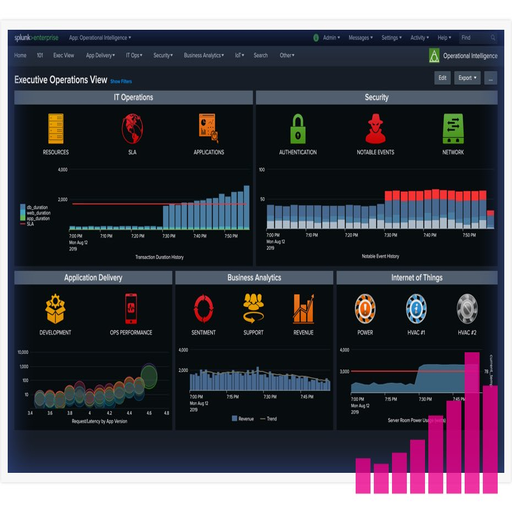
Checkmk Raw Edition

Checkmk Raw Edition: Monitoring That Stays Out of the Way Until You Need It If you’ve ever looked at Nagios and thought, “this could be easier,” you’re not alone. Checkmk Raw Edition takes the core of Nagios — its speed and plugin ecosystem — and wraps it in a saner, more usable interface. No magic. No vendor lock-in. Just solid monitoring that works. What It Actually Is

OS: Windows / Linux / macOS
Size: 34 MB
Version: 3.0.2
🡣: 12 stars

Checkmk Raw Edition: Monitoring That Stays Out of the Way Until You Need It

If you’ve ever looked at Nagios and thought, “this could be easier,” you’re not alone. Checkmk Raw Edition takes the core of Nagios — its speed and plugin ecosystem — and wraps it in a saner, more usable interface. No magic. No vendor lock-in. Just solid monitoring that works.

What It Actually Is

Checkmk Raw Edition is an open-source infrastructure and application monitoring system, built around Nagios but without the headaches. You still get the Nagios engine under the hood, but with a much more intuitive web UI, automatic service discovery, and a huge library of plugins and checks.

It runs on Linux, comes with its own web interface (Multisite), and supports everything from SNMP to SSH to agents — plus APIs, graphs, notifications, and custom checks.

Think of it as Nagios, but modern and actually manageable.

Where It Works Best

– Mid-sized networks with Linux, Windows, switches, and cloud mixed together

– Admin teams who want visibility but aren’t ready for full-blown Prometheus+Grafana stacks

– Shops currently using Nagios or Icinga that want an upgrade without rewriting everything

– Test labs, on-prem setups, or air-gapped environments

It scales better than you’d expect — especially for a free edition.

What Makes It Useful

Feature Why It Matters
Nagios Core Uses tried-and-true Nagios engine under the hood
Web UI (Multisite) No more editing text files to see graphs
Auto-Discovery Detects services and hosts — no manual check configs
Hundreds of Check Plugins Disk, memory, load, UPS, Docker, certificates…
Notifications Built-in alerting via email, script, webhook, etc.
Performance Graphs Integrated RRD/graphing with no extra setup
Custom Dashboards Drag-and-drop views of what matters
Open Source & Free GPL-licensed, community-supported, no timebombs

What You’ll Need

– A Linux server (Debian, Ubuntu, RHEL, etc.)

– Python, Apache, and Nagios-core dependencies

– SSH or SNMP access to monitored hosts (or agents installed)

– Disk space — monitoring data can add up fast

– Some time to get used to its logic (but far less than raw Nagios)

Checkmk Raw runs as a single-site instance by default, which is more than enough for most setups.

How to Install (Short Version)

1. Download the RAW edition from the official site:

https://checkmk.com/download

2. Install the package:

sudo dpkg -i check-mk-raw-*.deb # Debian-based

3. Create a site:

omd create mysite

omd start mysite

4. Login to the web UI:

http://your-server/mysite/

Default user: cmkadmin

5. Add hosts, auto-discover services, and tune thresholds. You’re monitoring.

What Admins Say

“It’s like Nagios but 100x easier to maintain. No text file juggling.”

“I had it showing graphs and alerts in 30 minutes. That alone makes it worth using.”

“Still runs on Debian 10 just fine. We use it to monitor a mix of old hardware and new cloud VMs.”

A Note on the “Raw” Part

Checkmk also has commercial editions with more dashboards, APIs, and integrations. Raw Edition skips those — but keeps the core features intact. If you’re okay with CLI and manual tuning, you won’t feel limited.

And hey — it’s open-source. If something bothers you, you can patch it.

Checkmk Raw Edition tuning guide for stable perf | Roottools

What is Checkmk Raw Edition?

Checkmk Raw Edition is an open-source IT monitoring and logging tool designed for self-hosted deployment. It provides a comprehensive platform for monitoring and logging workflows, with a strong focus on encryption, audit logs, and log retention. With Checkmk Raw Edition, users can enjoy a high degree of control over their monitoring and logging processes, ensuring tighter security, cleaner recovery paths, and safer operations.

Main Features of Checkmk Raw Edition

Checkmk Raw Edition offers a range of features that make it an attractive option for organizations seeking a reliable and customizable monitoring and logging solution. Some of the key features include dedupe and offline copies, which enable users to minimize data duplication and ensure that critical logs are always available, even in the event of a system failure.

Installation Guide

System Requirements

Before installing Checkmk Raw Edition, it is essential to ensure that your system meets the necessary requirements. These include a 64-bit operating system, a minimum of 4 GB of RAM, and a compatible web browser.

Step-by-Step Installation Process

Installing Checkmk Raw Edition is a relatively straightforward process. Here are the steps to follow:

  1. Download the Checkmk Raw Edition software from the official website.
  2. Extract the contents of the downloaded file to a directory on your system.
  3. Navigate to the extracted directory and run the installation script.
  4. Follow the prompts to complete the installation process.

Technical Specifications

Hardware Requirements

Component Minimum Requirement Recommended Requirement
CPU 2 GHz dual-core processor 3 GHz quad-core processor
RAM 4 GB 8 GB
Storage 10 GB free disk space 20 GB free disk space

Software Requirements

Checkmk Raw Edition is compatible with a range of operating systems, including Linux, Windows, and macOS. It also supports various web browsers, including Google Chrome, Mozilla Firefox, and Microsoft Edge.

Pros and Cons

Advantages of Checkmk Raw Edition

  • Highly customizable and flexible monitoring and logging solution.
  • Robust security features, including encryption and audit logs.
  • Support for dedupe and offline copies ensures data availability and minimizes duplication.
  • Free to download and use, with optional paid support.

Disadvantages of Checkmk Raw Edition

  • Steep learning curve due to the complexity of the software.
  • Requires significant system resources, particularly for large-scale deployments.
  • Limited support options for free users.

FAQ

How do I download Checkmk Raw Edition for free?

Checkmk Raw Edition can be downloaded for free from the official website. Simply navigate to the download page, select the desired version, and follow the prompts to complete the download process.

What are the key differences between Checkmk Raw Edition and paid monitoring tools?

While Checkmk Raw Edition offers many features and benefits, paid monitoring tools often provide additional features, such as advanced analytics and support options. However, Checkmk Raw Edition remains a popular choice due to its flexibility, customizability, and cost-effectiveness.

Checkmk Raw Edition overview for enterprise envi | Roottools

What is Checkmk Raw Edition?

Checkmk Raw Edition is a comprehensive monitoring and logging solution designed for enterprise environments. It offers a robust set of features to streamline IT operations, enhance performance, and ensure secure data management. With Checkmk Raw Edition, organizations can automate monitoring workflows, leverage snapshots and audit logs for secure operations, and benefit from a scalable architecture.

Main Benefits of Checkmk Raw Edition

Checkmk Raw Edition provides several key benefits, including:

  • Automated monitoring and alerting for proactive issue detection
  • Secure operations with snapshots and audit logs for compliance and data integrity
  • Scalable architecture to support growing IT infrastructures
  • Streamlined workflows for reduced administrative overhead

Key Features of Checkmk Raw Edition

Monitoring and Alerting

Checkmk Raw Edition offers advanced monitoring and alerting capabilities, including:

  • Real-time monitoring of IT infrastructure and applications
  • Customizable alerting thresholds and notification workflows
  • Integration with popular notification tools and platforms

Snapshot and Audit Log Management

Checkmk Raw Edition provides robust snapshot and audit log management features, including:

  • Automated snapshot creation and management for data protection
  • Comprehensive audit logging for compliance and security
  • Secure storage and management of snapshots and audit logs

Installation Guide

System Requirements

Before installing Checkmk Raw Edition, ensure your system meets the following requirements:

  • Operating System: Linux or Windows
  • Memory: 4 GB or more
  • Storage: 10 GB or more

Installation Steps

Follow these steps to install Checkmk Raw Edition:

  1. Download the installation package from the official website
  2. Run the installation script and follow the prompts
  3. Configure the system settings and monitoring parameters

Technical Specifications

Feature Specification
Monitoring Protocols SNMP, WMI, SSH, and more
Alerting Integrations Email, SMS, Slack, and more
Snapshot Storage Local disk, SAN, or cloud storage

Pros and Cons

Advantages

Checkmk Raw Edition offers several advantages, including:

  • Comprehensive monitoring and logging capabilities
  • Robust security features for secure operations
  • Scalable architecture for growing IT infrastructures

Disadvantages

Some potential disadvantages of Checkmk Raw Edition include:

  • Steep learning curve for new users
  • Resource-intensive installation and configuration

FAQ

Is Checkmk Raw Edition free to download?

Yes, Checkmk Raw Edition offers a free trial version for download. However, some features may be limited in the free version.

What is the best alternative to Checkmk Raw Edition?

Some popular alternatives to Checkmk Raw Edition include Nagios, Zabbix, and SolarWinds. However, the best alternative will depend on your specific IT monitoring and logging needs.

Checkmk Raw Edition deployment notes for IT team | Roottools

What is Checkmk Raw Edition?

Checkmk Raw Edition is a comprehensive IT monitoring and logging software designed to provide organizations with a unified platform for managing their IT infrastructure. It offers a range of features that enable IT teams to monitor, analyze, and optimize their IT systems, ensuring maximum uptime, performance, and security. With Checkmk Raw Edition, IT teams can streamline their monitoring and logging workflows, reducing the complexity and costs associated with managing multiple tools and systems.

Main Features of Checkmk Raw Edition

Checkmk Raw Edition offers several key features that make it an ideal choice for IT teams. Some of the main features include:

  • Multi-site monitoring and logging capabilities
  • Real-time monitoring and alerting
  • Comprehensive reporting and analytics
  • Integration with popular IT service management tools
  • Scalability and flexibility to support growing IT environments

Installation Guide

System Requirements

Before installing Checkmk Raw Edition, ensure that your system meets the following requirements:

  • Operating System: Linux or Windows
  • Processor: 64-bit, quad-core processor
  • Memory: 8 GB RAM (16 GB recommended)
  • Storage: 50 GB free disk space (100 GB recommended)

Installation Steps

Follow these steps to install Checkmk Raw Edition:

  1. Download the Checkmk Raw Edition installation package from the official website.
  2. Extract the contents of the package to a directory on your system.
  3. Run the installation script (install.sh on Linux or install.exe on Windows).
  4. Follow the prompts to complete the installation process.

Technical Specifications

Architecture

Checkmk Raw Edition is built on a modular architecture that enables it to scale and adapt to changing IT environments.

The architecture consists of the following components:

  • Monitoring engine: responsible for collecting and processing monitoring data
  • Logging engine: responsible for collecting and processing log data
  • Reporting engine: responsible for generating reports and analytics
  • User interface: provides a web-based interface for users to access and manage monitoring and logging data

Security Features

Checkmk Raw Edition includes several security features to ensure the integrity and confidentiality of monitoring and logging data.

Some of the security features include:

  • Authentication and authorization: ensures that only authorized users can access and manage monitoring and logging data
  • Data encryption: encrypts monitoring and logging data to prevent unauthorized access
  • Access controls: provides fine-grained access controls to restrict user access to specific features and data

Pros and Cons

Advantages

Checkmk Raw Edition offers several advantages, including:

  • Comprehensive monitoring and logging capabilities
  • Scalability and flexibility to support growing IT environments
  • Integration with popular IT service management tools
  • Robust security features to ensure data integrity and confidentiality

Disadvantages

Some of the disadvantages of Checkmk Raw Edition include:

  • Steep learning curve due to the complexity of the software
  • Resource-intensive, requiring significant CPU and memory resources
  • Limited support for certain operating systems and platforms

FAQ

What is the difference between Checkmk Raw Edition and Checkmk Enterprise Edition?

Checkmk Raw Edition is a free, open-source version of the software, while Checkmk Enterprise Edition is a commercial version that offers additional features and support.

Can I use Checkmk Raw Edition for large-scale IT environments?

Yes, Checkmk Raw Edition is designed to scale and support large IT environments, but it may require significant resources and configuration to optimize performance.

Migrating to Checkmk Raw Edition

Migration Plan

When migrating to Checkmk Raw Edition, it is essential to develop a comprehensive migration plan to ensure a smooth transition.

The plan should include:

  • Backup and restore procedures to ensure data integrity
  • Rollback procedures to ensure that the system can be restored to a previous state if necessary
  • Testing and validation procedures to ensure that the system is functioning as expected

Backup and Restore Procedures

It is essential to develop backup and restore procedures to ensure that monitoring and logging data is protected in case of system failure or data loss.

The procedures should include:

  • Regular backups of monitoring and logging data
  • Storage of backups in a secure location
  • Procedures for restoring data from backups

Conclusion

Checkmk Raw Edition is a powerful IT monitoring and logging software that offers a range of features and benefits for IT teams. While it may have some disadvantages, the advantages of comprehensive monitoring and logging capabilities, scalability, and robust security features make it an ideal choice for organizations of all sizes.

By following the installation guide, technical specifications, and migration plan outlined in this article, IT teams can ensure a smooth transition to Checkmk Raw Edition and optimize their monitoring and logging workflows.

Checkmk Raw Edition best practices for backups a | Roottools

What is Checkmk Raw Edition?

Checkmk Raw Edition is a comprehensive IT infrastructure monitoring tool that offers a wide range of features for admins and IT teams. As an open-source solution, it provides users with flexibility and customization options to cater to their specific needs. The program is designed to simplify the process of monitoring and logging workflows, making it easier to identify and resolve issues quickly.

Checkmk Raw Edition uses a variety of protocols and ports to collect data from different systems and devices. Understanding what ports it uses is essential for effective configuration and troubleshooting. Some of the key ports used by Checkmk Raw Edition include TCP ports 80, 443, and 6556, as well as UDP ports 161 and 162.

Main Features of Checkmk Raw Edition

Some of the key features of Checkmk Raw Edition include:

  • Comprehensive monitoring capabilities for IT infrastructure, including servers, networks, and applications
  • Customizable dashboards and reports for real-time insights and analytics
  • Automated discovery and inventory management for efficient system administration
  • Multi-tenancy support for managing multiple clients and projects from a single console

Installation Guide

System Requirements

Before installing Checkmk Raw Edition, ensure that your system meets the following requirements:

  • Operating System: Linux or Windows
  • Processor: 64-bit CPU with at least 2 cores
  • Memory: At least 8 GB of RAM
  • Storage: At least 50 GB of free disk space

Installation Steps

Here are the steps to install Checkmk Raw Edition:

  1. Download the Checkmk Raw Edition installer from the official website.
  2. Run the installer and follow the on-screen instructions to complete the installation.
  3. Configure the Checkmk Raw Edition server by setting up the database, creating users, and defining monitoring settings.

Technical Specifications

Ports and Protocols

Checkmk Raw Edition uses the following ports and protocols:

Port Protocol Description
TCP 80 HTTP Web interface access
TCP 443 HTTPS Secure web interface access
TCP 6556 Checkmk Agent communication
UDP 161 SNMP SNMP monitoring
UDP 162 SNMP Trap SNMP trap reception

Pros and Cons

Benefits of Checkmk Raw Edition

Some of the benefits of using Checkmk Raw Edition include:

  • Comprehensive monitoring capabilities for IT infrastructure
  • Customizable dashboards and reports for real-time insights and analytics
  • Automated discovery and inventory management for efficient system administration
  • Multi-tenancy support for managing multiple clients and projects from a single console

Limitations of Checkmk Raw Edition

Some of the limitations of using Checkmk Raw Edition include:

  • Steep learning curve for new users
  • Resource-intensive, requiring significant CPU and memory resources
  • May require additional configuration and customization for optimal performance

Hardening Checklist for Admins and IT Teams

Best Practices for Securing Checkmk Raw Edition

Here are some best practices for securing Checkmk Raw Edition:

  1. Use strong passwords and authentication methods for user accounts.
  2. Configure secure communication protocols, such as SSL/TLS, for agent communication.
  3. Regularly update and patch the Checkmk Raw Edition server to prevent vulnerabilities.
  4. Implement access controls and role-based access to restrict user privileges.

FAQ

Frequently Asked Questions

Here are some frequently asked questions about Checkmk Raw Edition:

  • Q: Is Checkmk Raw Edition free to download?
  • A: Yes, Checkmk Raw Edition is available for free download from the official website.
  • Q: What are the system requirements for installing Checkmk Raw Edition?
  • A: The system requirements for installing Checkmk Raw Edition include a 64-bit CPU with at least 2 cores, 8 GB of RAM, and 50 GB of free disk space.

Conclusion

Checkmk Raw Edition is a powerful IT infrastructure monitoring tool that offers a wide range of features for admins and IT teams. By understanding what ports it uses, following the installation guide, and implementing best practices for security, users can optimize the performance and security of their Checkmk Raw Edition installation.

Checkmk Raw Edition troubleshooting for errors a | Roottools

What is Checkmk Raw Edition?

Checkmk Raw Edition is a comprehensive monitoring and logging tool designed to streamline the process of managing complex IT infrastructures. As an open-source solution, it offers a wide range of features and functionalities that cater to the needs of both small-scale and large-scale organizations. By leveraging the power of Checkmk Raw Edition, users can efficiently monitor their systems, applications, and services, ensuring optimal performance, reliability, and security.

Main Features and Capabilities

Checkmk Raw Edition boasts an impressive array of features, including network discovery, automated monitoring configuration, and customizable dashboards. Its intuitive interface allows users to easily navigate and manage their monitoring environment, making it an ideal solution for organizations seeking to enhance their IT operations.

Benefits of Using Checkmk Raw Edition

The benefits of using Checkmk Raw Edition are numerous. Its open-source nature ensures that users have complete control over the software, allowing for seamless customization and integration with existing systems. Additionally, Checkmk Raw Edition’s scalability and flexibility make it an ideal choice for organizations of all sizes, from small businesses to large enterprises.

Installation Guide

Prerequisites and System Requirements

Before installing Checkmk Raw Edition, it is essential to ensure that your system meets the necessary requirements. These include a compatible operating system, sufficient disk space, and adequate memory. It is also recommended to have a basic understanding of Linux and networking concepts.

Step-by-Step Installation Process

The installation process for Checkmk Raw Edition is relatively straightforward. The following steps outline the process:

  • Download the Checkmk Raw Edition package from the official website or a trusted repository.
  • Extract the contents of the package to a suitable location on your system.
  • Run the installation script, following the prompts to complete the installation.
  • Configure the software according to your specific needs and preferences.

Troubleshooting Common Installation Issues

While the installation process for Checkmk Raw Edition is generally smooth, some users may encounter issues. Common problems include compatibility issues with certain operating systems or software components. In such cases, it is recommended to consult the official documentation or seek assistance from the Checkmk community.

Deployment Guide with Repositories and Retention Policies

Configuring Repositories

Checkmk Raw Edition allows users to configure repositories to store monitoring data. This can be done by creating a new repository, specifying the storage location, and setting the retention policy. The retention policy determines how long the data is stored before being deleted or archived.

Setting Up Retention Policies

Retention policies are essential in managing the storage capacity of your monitoring environment. Checkmk Raw Edition provides a range of options for configuring retention policies, including specifying the data retention period, configuring data compression, and setting up data archiving.

Retention Policy Option Description
Data Retention Period Specify the length of time data is stored before being deleted or archived.
Data Compression Enable data compression to reduce storage requirements.
Data Archiving Configure data archiving to store historical data for extended periods.

Troubleshooting Checkmk Raw Edition Errors

Common Error Messages and Solutions

Checkmk Raw Edition, like any other software, is not immune to errors. Common error messages include issues with data storage, network connectivity problems, and software compatibility issues. In such cases, it is recommended to consult the official documentation or seek assistance from the Checkmk community.

Best Practices for Troubleshooting

When troubleshooting Checkmk Raw Edition errors, it is essential to follow best practices to ensure efficient and effective resolution. These include:

  • Consulting the official documentation and community resources.
  • Checking system logs for error messages.
  • Verifying software and system configurations.

Alternatives to Checkmk Raw Edition

Other Monitoring and Logging Tools

While Checkmk Raw Edition is a powerful monitoring and logging tool, there are alternative solutions available. Some popular alternatives include Nagios, Zabbix, and Prometheus. Each of these tools has its unique features and advantages, and users should evaluate their options carefully before making a decision.

Comparison of Features and Capabilities

The following table provides a comparison of the features and capabilities of Checkmk Raw Edition and its alternatives:

Tool Key Features
Checkmk Raw Edition Network discovery, automated monitoring configuration, customizable dashboards.
Nagios Network monitoring, host and service monitoring, customizable dashboards.
Zabbix Network monitoring, distributed monitoring, customizable dashboards.
Prometheus Metrics-based monitoring, alerting, customizable dashboards.

Conclusion

In conclusion, Checkmk Raw Edition is a powerful monitoring and logging tool that offers a wide range of features and functionalities. Its open-source nature, scalability, and flexibility make it an ideal choice for organizations of all sizes. By following the installation guide, deployment guide, and troubleshooting best practices, users can ensure efficient and effective use of the software. Additionally, evaluating alternative solutions can help users determine the best tool for their specific needs and requirements.

Checkmk Raw Edition setup tips for secure infras | Roottools

What is Checkmk Raw Edition?

Checkmk Raw Edition is a comprehensive monitoring and logging solution designed to provide users with a powerful and flexible tool for managing their IT infrastructure. As a free and open-source alternative to traditional monitoring solutions, Checkmk Raw Edition offers a unique set of features that make it an attractive option for organizations of all sizes.

With Checkmk Raw Edition, users can monitor and manage their IT infrastructure, including servers, networks, and applications, all from a single interface. The software provides real-time monitoring, alerting, and reporting capabilities, making it easier to identify and resolve issues before they become critical.

Main Features of Checkmk Raw Edition

Some of the key features of Checkmk Raw Edition include:

  • Real-time monitoring and alerting
  • Comprehensive reporting and analytics
  • Multi-tenancy support for large-scale deployments
  • Integration with popular IT service management tools

Installation Guide

System Requirements

Before installing Checkmk Raw Edition, ensure that your system meets the following requirements:

  • Operating System: Linux or Windows
  • Processor: 2 GHz dual-core processor
  • Memory: 4 GB RAM
  • Storage: 10 GB free disk space

Step-by-Step Installation

Follow these steps to install Checkmk Raw Edition:

  1. Download the Checkmk Raw Edition installer from the official website.
  2. Run the installer and follow the prompts to select the installation location and language.
  3. Choose the installation type: Typical or Custom.
  4. Wait for the installation to complete.

Troubleshooting Guide for Errors and Timeouts

If you encounter issues during installation or while using Checkmk Raw Edition, refer to the following troubleshooting guide:

Issue Solution
Installation fails due to missing dependencies Ensure that all required dependencies are installed and try again.
Checkmk Raw Edition fails to start Check the system logs for errors and try restarting the service.

Technical Specifications

Architecture and Components

Checkmk Raw Edition is built on a modular architecture, consisting of the following components:

  • Monitoring Engine: Responsible for data collection and processing.
  • Web Interface: Provides a user-friendly interface for configuration and monitoring.
  • Database: Stores monitoring data and configuration settings.

Pros and Cons

Advantages of Checkmk Raw Edition

Some of the benefits of using Checkmk Raw Edition include:

  • Free and open-source, reducing costs and increasing flexibility.
  • Highly customizable and scalable, making it suitable for large-scale deployments.
  • Comprehensive monitoring and reporting capabilities, providing real-time insights into IT infrastructure performance.

Limitations of Checkmk Raw Edition

Some of the limitations of Checkmk Raw Edition include:

  • Steep learning curve due to complex configuration options.
  • Limited support for certain operating systems and applications.
  • Resource-intensive, requiring significant system resources for large-scale deployments.

FAQ

Frequently Asked Questions

What is the difference between Checkmk Raw Edition and the paid version?

Checkmk Raw Edition is a free and open-source version of the software, while the paid version offers additional features and support.

How do I download Checkmk Raw Edition?

Checkmk Raw Edition can be downloaded from the official website.

Is Checkmk Raw Edition compatible with my operating system?

Checkmk Raw Edition is compatible with Linux and Windows operating systems. However, it may not be compatible with certain versions or distributions. Check the system requirements before installing.

Other articles

Submit your application